Real categories
Kicks, snares, claps, hats, cymbals, toms, percussion, 808s, bass, synths, keys, vocals, FX and more, read from each file's name. Loops are split from one-shots, and we verify against the actual audio length, so a four-second "kick" files as a drum loop, not a kick.
Browse by tempo and key
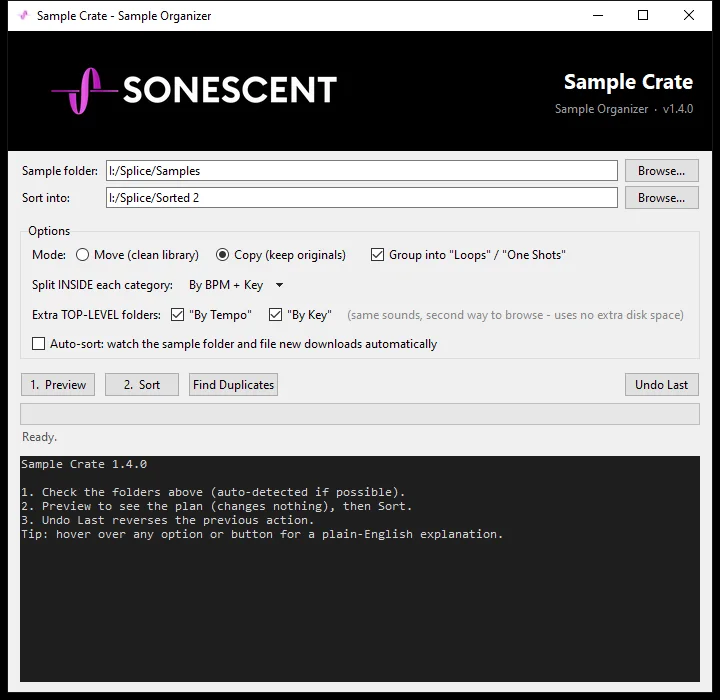
Optional By Tempo and By Key folders hold the same sounds a second way, so you can grab any 128 BPM loop or every bass in C minor. They are hard links, not copies: zero extra disk space.
Duplicate finder
Sample libraries collect identical copies. Sample Crate finds files with byte-identical content and quarantines the extras for review. Nothing is ever deleted for you.
Auto-sort new downloads
Flip one switch and the app watches your download folder, filing new packs into place automatically. Set it once and your library stays organized.
Preview first, undo always
Preview shows exactly which folders would be created and where every file would go before anything moves. Every action is logged, and Undo Last puts every file back exactly where it came from.
Copy or move, your call
Copy mode builds an organized library beside your original folders and never touches them. Move mode relocates files for one clean copy of everything. Both are fully reversible.