De-ess and de-breath together
Two jobs that usually take two plugins and two passes. Breath reduction is its own stage with its own detector, so it never fights the de-essing, and both are drawn on the same scope in their own colours.
A de-esser and a de-breather in one plugin. Four bands on one plot handle sibilance, harshness, whistles and plosives, and a separate breath stage finds the breaths between phrases and turns them down without removing them. Every reduction is drawn where it happens, on the spectrum and on the waveform, and every one of them can be soloed, so you hear what is being removed before you decide it should be.
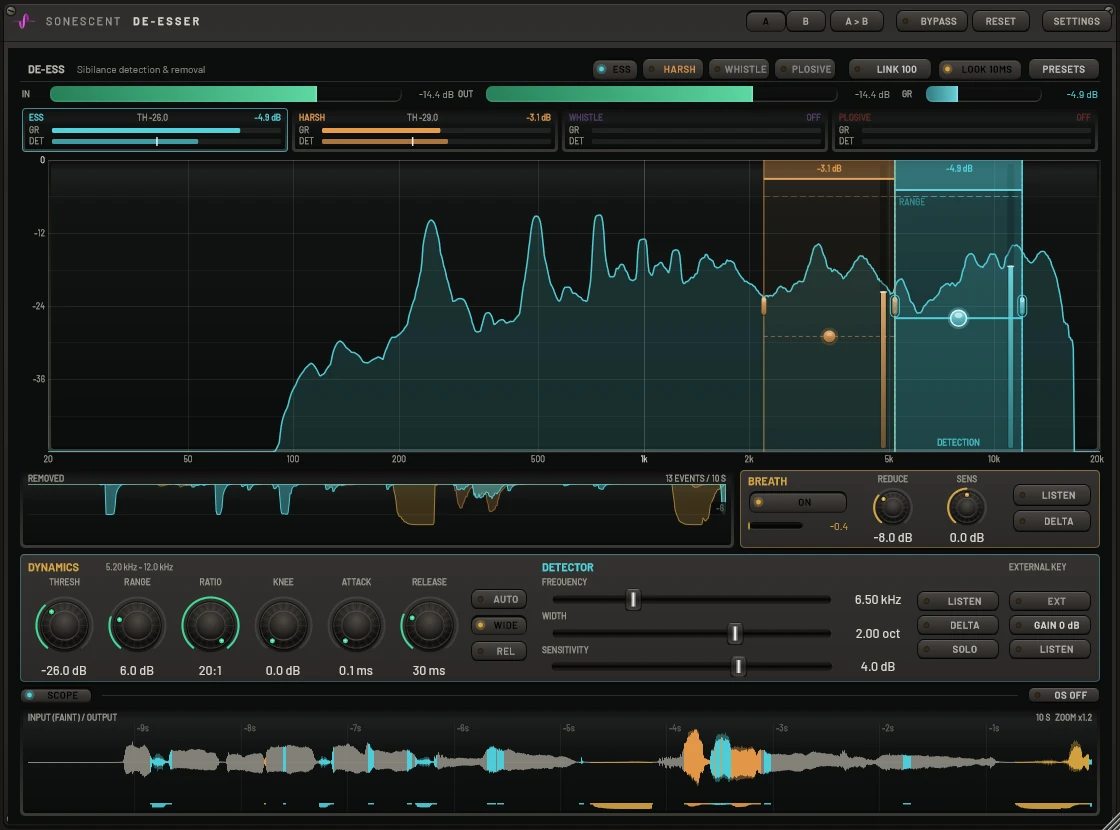
ESS handles sibilance. HARSH takes the upper-mid spikes that make a voice tiring. WHISTLE sits on a single ringing tone. PLOSIVE catches the low thump of a p-pop. Each one is a band you drag on the live spectrum, with its own threshold node, its own detector and its own colour, and each starts from settings that suit its job. Bands can be as narrow as a sixth of an octave, and on a band set to cut only its own range the edges you see are the half-depth points of the cut that is actually applied, so a narrow band is a narrow cut. RANGE is drawn in every band as a dashed floor: the most that band may ever remove, however hard it is triggered.

Each band listens through its own focused detector, a steep window you can move and narrow inside the band, down to a tenth of an octave. The detector decides when; the band decides what is reduced. LISTEN plays exactly what the detector hears, so you tune it by ear on the ess itself. Right-click a band's button and choose Detect, and it listens to your vocal as it plays, then sets that band's focus, width and threshold for this voice. WIDE turns the whole signal down for the length of the consonant, which is how a careful engineer rides a fader; SPLIT cuts only the band. REL lets the threshold ride the tracked level of the performance, so quiet verses and loud choruses are treated alike. The plosive band uses a burst detector instead: it triggers only when the low end jumps above its own recent level, so a p-pop ducks and a steady low note never does.

Along the bottom, the last ten seconds of the vocal scroll past. The faint shape is what came in and the solid shape is what went out, so anything faint showing past the solid was removed. Each moment takes the colour of the band that reduced it, teal for an ess, amber for harshness, gold for a breath, and a ribbon underneath shows how deep the cut went. You can see at a glance which words were touched, by which band, and whether a band is firing on things it should leave alone. Click to freeze it for a closer look, scroll to change the time span, or fold the drawer away when you do not need it. Above it, the REMOVED lane keeps a ten-second history in decibels and counts the events it caught.

A vocal with every breath removed sounds wrong, because the listener expects a singer to breathe. So this stage tucks breaths back instead of gating them out. It looks for sound that is quiet compared with the singing, has no pitch, is noise-like rather than tonal, is not an ess, and lasts long enough to be a breath rather than a consonant. When all of that is true it eases the level down by the amount you set with REDUCE, and lets go within a few milliseconds when the voice returns. SENS decides how loud a breath may be and still count. LISTEN plays only what it considers a breath, DELTA plays only what it removed, and the dips are drawn in gold on the scope and the history lane, so you can check every decision it made.

Built on the same dynamics engine as Cartigraph and the Sonescent Multiband. Nothing here is named after gear it imitates, and nothing is hidden behind a single amount knob: every control does one thing you can see on the plot.
Two jobs that usually take two plugins and two passes. Breath reduction is its own stage with its own detector, so it never fights the de-essing, and both are drawn on the same scope in their own colours.
Zero to 15 ms, 10 ms by default. The detector reads ahead, so the reduction is already in place on the first sample of the consonant instead of arriving late. The delay is reported to your DAW to the sample.
DELTA plays only what a band is taking away. SOLO plays the band itself through a steep window. If what you hear in DELTA is an ess, the settings are right. If you hear words, they are not.
Link from 100 percent, where both channels always get the same reduction and the image cannot shift, down to fully independent. Or process only the centre or only the sides and leave the rest untouched.
Trigger any band from a sidechain input, with its own gain for calibrating the detector and a LISTEN button to confirm the routing. The key is never heard in the output.
2x or 4x through linear-phase filters for very fast, deep reduction at 44.1 or 48 kHz, where quick gain changes can fold back as aliasing. Off by default, and honest about it: at normal settings the difference is small.
Two complete settings snapshots to flip between while you listen, and 64 steps of undo over every move on the plot and the strip.
Nine factory starting points for full-range, higher and lower voices, gentle and firm control, extra bands, and cymbals. A preset only sets parameters, so everything it does stays on the plot.