Free

Draw the movement. On our effects, and on your own plugins.

Sonescent Motion is a tempo-synced shaper. Draw a line and it moves your volume, a resonant filter, the stereo position and width, how hard the sound is driven, its pitch, or time itself: stutters, half speed, reverse and tape stops. The FX tab holds up to four of your own VST3 plugins, and the line decides how much of them you hear, so a reverb can arrive on beat four and leave again. The tabs across the top are the signal chain, in the order you drag them into, and there can be two of every effect. It all works on up to four frequency bands, locked to your DAW's grid or fired from your kick. Motion adds no latency of its own. Every feature is in the free version, because there is no other version.

Free forever · VST3 + AAX (+ AU on Mac) · Windows and macOS · no license key
Read the guide →
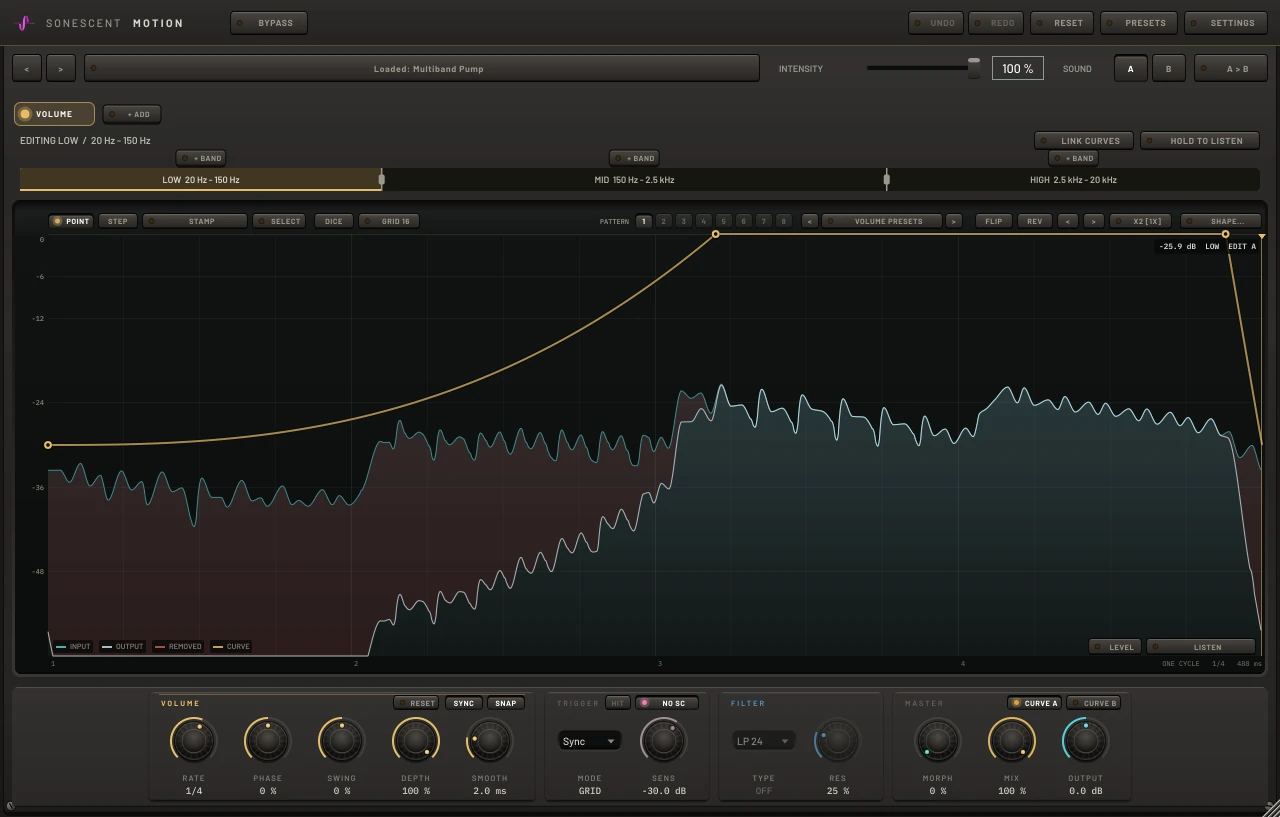
Sonescent Motion with three frequency bands: the gold volume curve ducks the low band on every beat, the live input wraps behind it, and the part of the signal the curve removed is filled red
See it in action

Watch it work

The quick start guide: Motion from the first click, in a few minutes. The longer walkthrough is on the guide page.

Rather try it yourself? Get Motion free · Read the guide

The editor

Draw it the way you draw an EQ.

Click anywhere on the graph, the line included, and a point lands there, ready to drag. Right-drag (or Ctrl-drag, Cmd-drag on a Mac) bends a segment as far as you want, from a gentle ease to a near step. Or pick a drawing tool. STEP paints flat cells as you drag, so a gate pattern takes one stroke. STAMP drops a shape into every cell you cross: a duck, a swell, a triangle, a hump or a pulse. DICE rolls a new pattern for the tab you are on, built from a short motif that repeats and varies so it sounds like a rhythm, and Ctrl+Z steps back through the rolls. GRID sets the cell size, straight or triplet, and the tool row also flips, reverses, shifts and doubles the whole pattern. Every tab holds eight of these lines as PATTERNS: click a number above the graph to switch, automate the tab's Pattern parameter, or play MIDI notes C1 to G1 and the line changes on the beat. SELECT copies and pastes a stretch of any line: drag across it, Ctrl+C, click where it goes, Ctrl+V, or Ctrl+D to repeat it straight after itself. Behind the line, your live audio wraps in place every cycle, the output sits over it, and everything the line took out is filled red, so you see the effect before you judge it by ear. Switch that view to WAVE and the same audio is drawn as a waveform, thinning wherever the line dips.

The Motion display with the drawing tools above it: STAMP set to Duck, and a volume pattern of ducks and short steps rolled by DICE, drawn over the live audio wrapped behind it
Modules

Eight effects, each on its own clock.

VOLUME is the gain ride. FILTER sweeps a resonant low-pass, high-pass or band-pass along the line, with the top of the graph at 20 kHz and the floor at 20 Hz, so a wobble is a real filter moving and not a volume trick. PAN moves the sound across the stereo field at constant power, and WIDTH opens and closes the stereo image, from mono to twice as wide. DRIVE, TIME, PITCH and FX have their own sections below. There can be four of every effect: VOLUME 2, 3 and 4, FILTER 2, 3 and 4, and the same for PAN, WIDTH, DRIVE, TIME, PITCH and FX, each with its own controls, its own rate and its own place in the chain, so a two-bar swell can run under a sixteenth-note gate, two filters can wobble at different rates, four TIMEs can each hold a recording of their own, and four racks of your own plugins can each be drawn in and out on a line of their own. Thirty-two tabs is the most you can have at once, and the row scrolls when they stop fitting. Each tab has its own line, rate, swing, phase, depth and smoothing, and each one chooses between the grid and the trigger on its own. Switch them on with a click and they all run at once. Every tab also has its own PRESETS list, in the toolbar above the graph, which loads onto that tab alone: pick a pump for VOLUME, a wobble for FILTER and a tape stop for TIME, and none of them touches the others.

Motion's FILTER tab: a blue cutoff line sweeping a resonant 24 dB low-pass between 80 Hz and 5 kHz every eighth note
The chain

The tabs across the top are the signal chain.

The row runs left to right, with a small arrow between each tab, and that is the order your sound passes through. Drag a tab to move it. The x takes one out, + ADD brings one in. Put DRIVE at the front and the gate after it works on the driven sound. Put it at the end and it bites on whatever the gate left. The order is part of the sound, so it is saved with the sound. The FX tab can sit anywhere in the row, which means your own plugins can run before or after any of ours.

Motion with eight tabs in a chosen order, TIME first and FX last, an arrow between each tab, a second filter among them and + ADD at the end of the row
FX

Four of your own plugins, inside Motion.

The FX tab holds a rack of up to four VST3 plugins from your own collection: a reverb, a delay, whatever you already reach for. Each slot has its own EDIT window, a BYPASS and a CPU readout, and you can drag slots into a different order or drop a .vst3 file straight onto one. Motion finds your plugins with a scanner that ships inside it and runs in its own process, so a plugin that crashes while it is being scanned cannot take Motion down with it. The rack saves with your session. If a plugin is missing on another machine, Motion remembers what was in the slot and picks it up when it can. Whatever latency your plugins add, Motion reports to the host, so the track stays in time.

Motion's FX rack open: three of the four slots hold the user's own VST3 plugins, each with EDIT, BYPASS and a CPU readout, and the fourth is waiting for one
FX in time

Throw the reverb in on beat four.

On the FX tab the line is how much of the rack you hear, so your effects arrive and leave on the grid instead of sitting there the whole way through. A reverb can be thrown in on the last beat of the bar, a delay chopped in sixteenths, a whole rack swelled in across a bar. There are two routings. In Mix, the line blends the rack's output in and out. In Send, the line feeds the rack, so a delay's echoes and a reverb's tail ring on after the line has closed again. Sixteen presets on this tab give you the common moves to start from, and FX draws and edits like every other tab: the same drawing tools, the same rate, the same choice between the grid and a trigger.

Motion's FX tab with the Last Beat Throw preset: a red line holding the rack silent for the first three beats and fully open on the fourth, with the route menu set to Mix and OPEN RACK in the deck below
Time

Stutter, slow down, reverse. No latency added.

On the TIME tab the line is how far behind live the sound plays, and the top line is live. Draw a step down and the audio you just heard plays again: that is a stutter, and a staircase of steps is a roll. Draw a slope and the sound slows down: half as steep as the diagonal is half speed, the full diagonal is a stop, and twice as steep plays backwards. The STAMP tool has the figures ready made (Repeat x2, x3 and x4, Half speed, Reverse, Tape stop), sized exactly to the grid cell you drop them in, so repeats land in time. Every jump is crossfaded, a repeat is a sample-exact copy of what it repeats, and a tape stop fades out as it stops. MIX blends the repeats with the live sound, so a stutter can sit underneath the part instead of replacing it, still locked to the grid. TIME only ever plays audio that has already happened, which is why Motion adds no latency of its own.

Motion's TIME tab playing the Reverse Beat preset: the line falls across the fourth beat, and the output there is the third beat of a drum break played backwards, its hits swelling up instead of dying away
Drive

Drive that follows the groove.

DRIVE puts saturation on a line: the floor is clean and the top is everything, so a bass can growl in the gap between kicks, or drums can bite only on the hit. There are four types. SOFT rounds the peaks, HARD flattens them, FOLD bends the wave back on itself, and CRUSH drops the bit depth and the sample rate. Every type leaves the sound untouched wherever the line rests on the floor, holds the level steady as the drive rises so you hear density and not a volume jump, and never pushes a full-scale signal over. TONE takes the fizz off the driven sound, and MIX blends it with the clean sound going in, so a hard setting can add grit underneath without flattening the punch. Where DRIVE sits is up to you: drag it to the front of the chain and the gate that follows works on the driven sound, drag it later and it bites on whatever the tabs before it left. Like everything else, it works per band.

Motion's DRIVE tab with the Growl Between Kicks preset: an orange line rising in the gap between beats, with TONE and MIX in the deck below
Pitch

Dives, octave hops and harmonies, on a line.

On the PITCH tab the line is the pitch, an octave up or down, with a gridline on every semitone. SNAP puts each point on a whole semitone, so a step up to 7 is a fifth and a step to 12 is an octave: draw steps for an arpeggio, a slope for a bend, or let the last beat fall away for a dive. GLIDE sets how quickly the pitch travels between steps. MIX blends the shifted sound with the original, so a line held on 7 at MIX 50 is a fifth sitting on top of the part. Like TIME, PITCH only plays audio that has already happened, so Motion still adds no latency of its own; while the line is away from 0 the shifted sound runs about 20 ms behind, and wherever it rests on 0 the sound comes out exactly as it went in. There are two PITCH tabs, and each works per band.

Motion's PITCH tab with the Arp 0-7-12-7 preset: a violet line stepping from the root up to a fifth, an octave and back to a fifth across the bar
Bands

Pump the low end. Leave the top alone.

Click the frequency row above the graph and Motion splits the sound right there, anywhere from 20 Hz to 20 kHz, up to four bands. Click a band and the selected module gets its own curve there: duck only the sub under the kick while the growl stays up front, or pan only what sits above 250 Hz so the low end never wanders. A new band starts from the curve it was split from, so nothing changes until you draw. Right-click a band to mute it, bypass it so every tab leaves it alone, or delete it. Hold HOLD TO LISTEN to hear one band on its own while you shape it. The split is a Linkwitz-Riley crossover that sums back flat when nothing moves, and with one band there is no crossover in the path at all.

Motion split into four bands, LOW, LOW MID, HIGH MID and HIGH, with the LOW band selected and its own volume curve ducking it on every beat
Trigger

Ducks that follow the real kick.

Set a module to TRIGGER and its curve fires once from every hit instead of looping. Route your kick to Motion's sidechain input, or play MIDI notes into it, and the duck lands on the actual pattern: fills, offbeats and ghost notes included. The kick is drawn in pink behind the line, so you shape the recovery against the sound it answers, and HIT measures how long its transient lasts: click FIT and the duck is written exactly that wide, down on the hit and back up before the tail. That works in sync mode too, so a quarter-note duck can be fitted to the kick under it. SENS sets how loud a hit has to be, and because trigger is per module, a kick-triggered duck can run under a filter that stays locked to the grid.

Motion in TRIGGER mode: the kick drawn in pink behind the duck, the HIT window shaded over its transient and the FIT pill showing its length
Timing

Every note length, or no grid at all.

RATE steps through every division from 1/64 to eight bars, dotted and triplet included, locked to your host's tempo and position so a pattern never drifts. Turn SYNC off and the same knob becomes a free speed from 0.05 to 40 Hz, and automating it upward accelerates smoothly into a wind-up instead of stepping. SWING delays every second division up to the full triplet position, PHASE slides a pattern against the beat, and MORPH blends every module from its curve A to its curve B, so one automation lane can move a verse groove into a drop groove.

Motion's PAN module on the high band only: a violet curve sweeping left and right every eighth note while the low band stays centred
Presets

Find a sound, then dial it in.

PRESETS opens a browser, not a menu. Search across names, descriptions and sources, filter by category or by style (subtle, rhythmic, creative), star your favourites, and read what each preset does and what to try it on before you load it. The arrows beside the preset name step through the list while your track plays. INTENSITY is one slider for the whole preset: it scales every tab's movement toward its resting line, so a pump that is too much at 100 is a gentle breath at 30, with the timing untouched. SOUND A and B hold two complete sounds, every control and every line, so you can flip between two ideas while the track plays. Neither a preset nor a SOUND switch touches the FX rack, so the plugins you loaded stay loaded while you audition. Each tab has a PRESETS button of its own too, with arrows either side to step through its list, 83 presets across the tabs, including 16 on FX. Those load one tab's line and knobs and leave the rest of the sound alone, so you can build a sound from parts. Every load, every switch and every RESET is one Ctrl+Z away, or one click on UNDO for hosts that keep the keyboard.

Motion's preset browser: a searchable list on the left and, on the right, the selected preset's description and a note on what to try it on, with the INTENSITY slider and the SOUND A and B buttons in the bar above it

Nothing held back, and nothing hidden.

Free does not mean cut down. This is the whole plugin, built to the same standard as everything else we make, with every control doing one thing you can see on the display.

No latency of its own

Every tab and every band processes with no added delay, TIME included. A plugin you load into the FX rack brings whatever latency it has, and Motion reports that to your host, so the track still lines up with the rest of the session.

Click-free edges

Each tab smooths its own movement, with a hard minimum that keeps even a vertical step from clicking, and TIME crossfades every jump.

46 factory presets

Pumps, gates, swells, risers, filter wobbles and plucks, auto pan, multiband ducks, chord chops, a vocal glitch, drive and width patterns, stutter fills, a reverse beat and a tape stop, from a 2 dB mix bus breath to a full glitch. Each one says what to try it on. Every tab has its own list as well, 83 presets across the tabs, each loading onto that tab alone.

Repeats and X2

Double a pattern into half the time up to 16 repeats, or make linked copies where editing one edits them all. Detach one for a variation.

Hear what it removed

Hold HEAR REMOVED to listen to only the signal Motion took out: the fastest way to hear whether a duck is catching the right part of a sound.

Mix and output

Blend the moving signal with the untouched input for a subtler effect, then trim the output to level-match what you started with. TIME and DRIVE each have a MIX of their own.

Undo that covers everything

64 steps of undo across every line and every control, including preset loads, band splits, tab switches and DICE rolls, plus a RESET on each tab for just that line. The history is still there after you close and reopen the plugin window.

Every control explained

Hover any control for a plain-language card describing what it does. Turn them off once the plugin feels like home.

Your rack travels with the session

The plugins in the FX rack, their order and their own settings save with the session and come back with it. Open that session on a machine where one of them is not installed and Motion holds the slot, then picks the plugin up when it can.

Scanning that runs out of the way

Motion finds your plugins with a scanner that ships inside it and runs in its own process, so a plugin that crashes while it is being scanned cannot take Motion down with it. You can also drop a .vst3 file straight onto a slot.

198 parameters, all automatable

Every control is exposed to your host, so rates, depths, mixes and levels can be automated from the arrangement rather than set once and left.

Eight patterns per tab

Each tab holds eight whole lines. Switch them with a click, with each tab's Pattern parameter, or from a MIDI clip: notes C1 to G1 change the line at the exact sample they play, and in TRIGGER mode they fire it too.

A card when you first open it

The first time Motion opens, a welcome card offers eight places to start, so the first sound is one click away. It stays out of the way after that, and SETTINGS brings it back.
Get Sonescent Motion
Free
✓ Every feature ✓ Free updates ✓ No key ✓ No card

We’ll email your download links. By entering your email, you are also subscribing to marketing emails from Sonescent: production tips, product updates and offers. You can unsubscribe at any time. Privacy policy

Windows 10 / 11 (64-bit) · macOS (Apple silicon & Intel). Formats: VST3, AAX (Pro Tools) and Standalone, plus AU on macOS. A 64-bit VST3 or AAX host is required. The FX rack loads VST3 plugins, on both Windows and macOS.