Free plugin from Sonescent

How loud is your track, really?

The Sonescent Loudness Meter answers that in one glance: integrated LUFS as the big number, short-term loudness and true peak right beside it, and a graph of how the loudness moved through the song. It is free, it needs no key or account, and it never touches your audio.

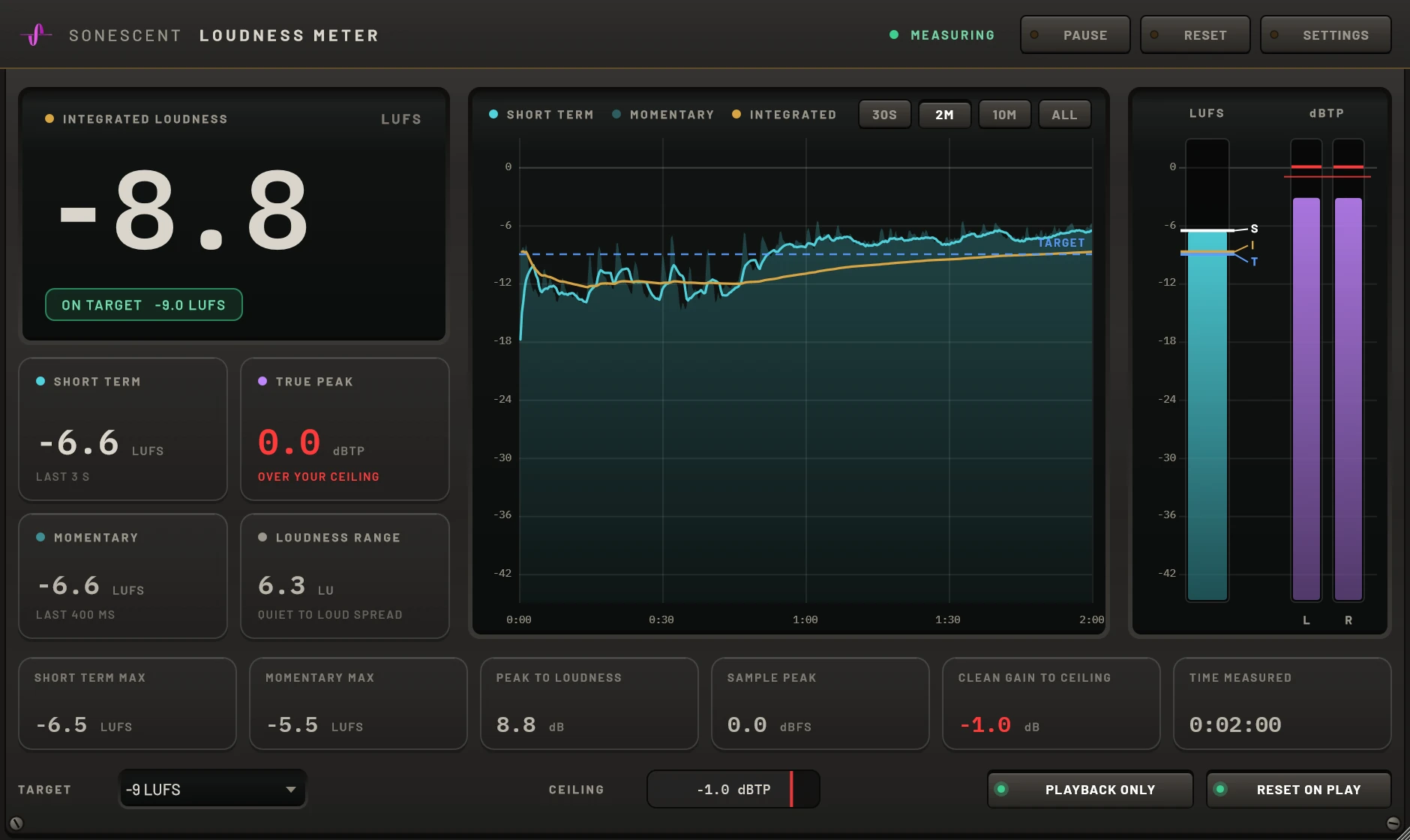
Sonescent Loudness Meter reading -8.8 LUFS integrated against a -9 LUFS target, with the loudness history graph showing a verse rising into the chorus, the loudness bar and the left and right true peak bars
What it measures

Everything you need to read a master, nothing you have to decode.

The three numbers first

Integrated loudness is the hero. Short term (the last 3 seconds) and true peak sit next to it. Momentary, loudness range, sample peak, peak to loudness ratio and the held maxima are all there, one row down, out of the way.

Loudness over time

The graph draws short term, momentary and integrated loudness across the pass you just played, so you can see how far the drop sits above the breakdown. It shares one vertical scale with the meters, and it uses a fixed amount of memory however long the session runs.

True peak at 8x

True peak is measured on a copy of the signal interpolated 8 times at 44.1 and 48 kHz (4 times at 96 kHz). On a worst-case test tone it reads within about 0.1 dB of the real peak, where a 4x detector can miss by several tenths. It never reads below the sample peak.

Measured to the standard

Loudness follows ITU-R BS.1770 with gated integration, and loudness range follows EBU Tech 3342. The weighting filter matches the published ITU coefficients, including the low end, which is where bass-heavy music is won or lost. We run the tone-based EBU test signals against every build.

A target that stays honest

Pick a reference level, or type your own, and the meter shows how far above or below it you are. It is a line you chose, not a rule: a fresh instance has no target at all, and nothing on the screen tells you what loudness you are supposed to hit.

It never touches your audio

The plugin does not write to the audio it receives, in 32 or 64 bit hosts, so what comes out is bit for bit what went in, with zero latency. It has no license key, no account and no network code. It does not connect to anything.
How it works
  1. Put it last on your masterAfter the limiter, after everything, so it reads exactly what you would export.
  2. Press playIt measures while your DAW plays and starts fresh on every play. Play the whole track for a true integrated number.
  3. Read three numbersIntegrated for the track, short term for the section, true peak for the ceiling. The graph shows how you got there.

One piece of arithmetic, and only one

Gain is linear: turn a whole track up by 1 dB and its true peak rises by 1 dB and every LUFS value rises by 1 LU. So the meter shows CLEAN GAIN TO CEILING, your ceiling minus the highest true peak. If it reads +1.2 dB and integrated reads -10.8 LUFS, then 1.2 dB of plain gain gives you -9.6 LUFS with the peak sitting on the ceiling.

Going louder than that takes limiting or clipping, and what those do depends on the music. We do not predict it, and the meter makes no mastering recommendations of any kind.

Get the Sonescent Loudness Meter
Free
✓ No license key ✓ VST3, AU & AAX ✓ Free updates ✓ No card

We’ll email your download links. By entering your email, you are also subscribing to marketing emails from Sonescent: a few short emails on reading loudness well, then production tips, product updates and offers. You can unsubscribe at any time. Privacy policy

When the numbers are not enough

A meter tells you how loud your master is. It cannot tell you how it stands next to the records you love. That comparison, level matched so loudness cannot fool you, is what we built Cartigraph for.

See Cartigraph
Windows 10 / 11 (64-bit, signed installer) · macOS 10.13+ (Apple silicon & Intel, notarized). Formats: VST3, AAX (Pro Tools) and Standalone, plus AU on macOS. Mono and stereo tracks.