24 bands
Bell, low and high shelf, low and high cut with selectable slopes, notch, band pass, tilt and all pass. Drag on the curve, or right-click any node for the full menu.
Analyze listens to your mix and flags the build-ups by name. Spectral suppression takes out the resonances as they happen. Everything it finds, you can see, hear on its own, and overrule.
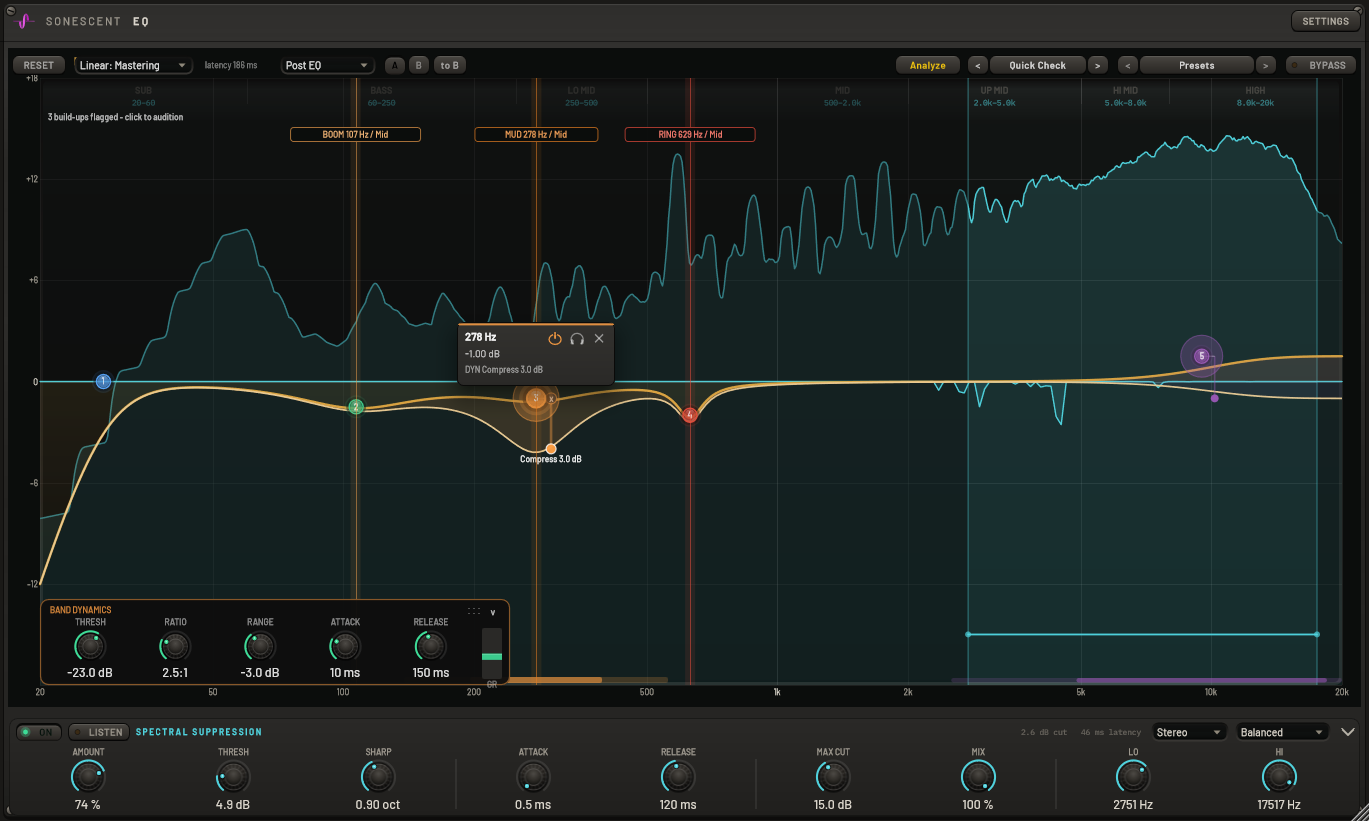
Press Analyze and play five seconds of your busiest section. It measures which frequencies stay loud through the whole passage rather than the ones that merely peak, so a ringing room mode gets flagged and a loud musical note does not. Each build-up is labelled with what it is and where it lives: BOOM at 107 Hz, MUD at 278 Hz, RING at 629 Hz, and whether it sits in the mid or the sides. Click a flag to hear that band on its own. It never touches your curve: it points, and you decide what to do about it.

A short-time Fourier engine watches every frequency against its own neighbours and pulls down only the ones that stick out, re-measuring the spectrum up to nearly two hundred times a second. That is how a resonant vocal, a ringing snare or a harsh cymbal gets tamed without a static notch dulling everything around it. Set the ceiling and the engine never cuts deeper, drag the focus range onto the region you care about, and hit LISTEN to hear exactly what is being removed before you commit to it.

Any bell, shelf or tilt band can be dynamic. Give it a threshold and a range and it compresses or expands itself against its own frequency content, so a boxy low-mid only ducks on the loud notes and leaves the quiet ones alone. The motion is drawn on the curve as it happens, on a rail at the node, so you can watch how far each band is actually moving instead of guessing from a gain-reduction number.

The detection is the reason to reach for it. What keeps it on the track is everything else: twenty-four bands with real filter shapes, stereo placement per band, and a linear-phase mode that does not glitch when you move something.
Bell, low and high shelf, low and high cut with selectable slopes, notch, band pass, tilt and all pass. Drag on the curve, or right-click any node for the full menu.
Placement is per band, not per instance. Cut a resonance out of the sides while the mid stays untouched. Each placement gets its own colour and a badge on the node.
Three qualities. Moving a band crossfades between two convolvers, so the curve changes without the click or dropout that usually comes with a linear-phase redesign.
Whatever the current mode costs is printed next to the mode selector and reported to your DAW. No guessing which setting added delay.
Hit the headphone on a node to hear just that band. It latches, so both hands stay free to move the node around while you listen.
Band-pass the mix to a named range and back again, for checking one region without building a band you then have to remember to delete.
Two complete band sets per instance. Flip between them, or copy one into the other and edit from there.
Twelve bands with spectral suppression running cost a few percent of one core at 48 kHz. The analyzers stop entirely when no window is open, because an EQ you put on every channel should cost nothing while you are not looking at it.