Click-to-add saturation bands
Add a saturation range from the + target on the spectrum, up to six. Drag an edge to resize it, drag the middle to move it, right-click to split or remove it. Each band keeps its own curve and amount.
Nine saturation curves and four clip modes, and every one of them tells you what it actually did: the harmonics it added, the delta it carved out, and on the scope, exactly which samples got cut.
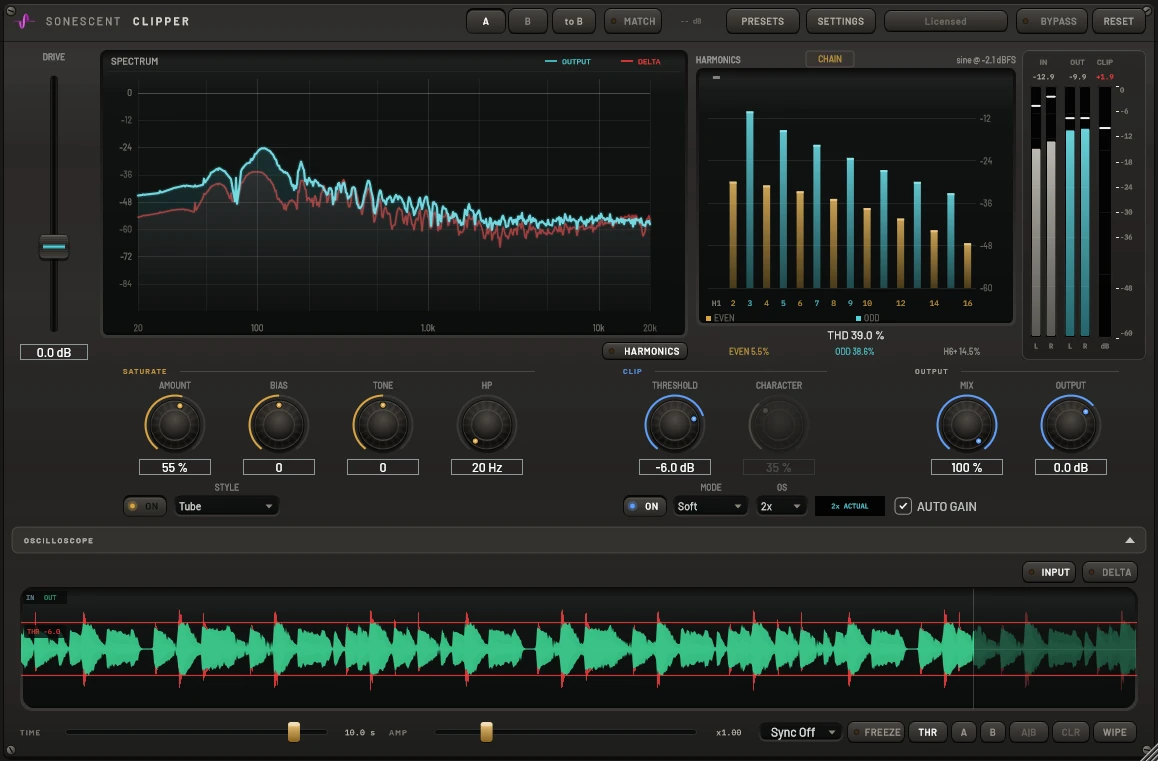
Soft, Tube, Tape, Transformer and Tape Machine model real gear behavior; Diode, Fold, Rectify and Crush go somewhere gear doesn't. AMOUNT is level-compensated per curve, so raising it drives the character harder without the ceiling quietly dropping out from under you. The harmonic ladder reads H1 through H16 off the exact curve at the input's current level, split into even and odd with a running THD, so you can see a curve's character (odd-heavy grit versus even-rich warmth) before you commit to it by ear.

A clip threshold is a per-sample peak, so drawing it on a spectrum would be a lie: the energy in any one bin sits far below it, no matter what's actually getting cut. It lives on the oscilloscope instead, an exact horizontal line on the same trace as your audio, with every clipped sample filled in red. Four modes from Hard through Absurd, oversampling up to 8x so the clipping itself doesn't alias, and AUTO GAIN trims the makeup exactly (not a loudness guess) so raising DRIVE never just tricks your ears with more volume.

The ladder computes the combined saturate-then-clip curve at the chain's actual input level, not a generic model, so what you see is what that signal is really doing. Sixteen harmonics, even in gold and odd in cyan, with a running THD and an H6-and-up figure for the upper grit. Push a curve hard enough and you'll watch the odd harmonics climb before you hear the edge arrive, which is the difference between dialing in character and just finding out where it breaks.

DRIVE feeds both stages, SATURATE and CLIP each have their own bypass, and the whole thing stays honest about what it changed: bit-exact bypass, a loudness-matched A/B, and a scope that shows exactly what got removed.
Add a saturation range from the + target on the spectrum, up to six. Drag an edge to resize it, drag the middle to move it, right-click to split or remove it. Each band keeps its own curve and amount.
Input, output and delta on one ring buffer, latency-aligned. Red is exactly what got cut, not an estimate. Freeze it, zoom the time and amplitude axes independently, and watch the threshold line drawn right on the trace.
MATCH trims the processed side back to the input's loudness before you compare, so a hotter signal can't pass itself off as a better one. A/B, to B, and delta listen on the wet-minus-dry signal itself.
AUTO GAIN is a precise inverse of DRIVE at the output, not a loudness estimate. Push the input harder and the output level holds, so you're judging character, not volume.
Bypass runs through the plugin's own latency-matched dry ring rather than a host bypass call, so A/B and delta listen line up to the sample instead of drifting by a few.
Hard, Soft, Distort and Absurd, with a CHARACTER knob that sweeps the curve in Distort and Absurd. Soft bends the signal below the ceiling too, so it's the one to reach for when you want the approach softened, not just the peak.
Each stage runs oversampled: the saturator at a fixed 4x, the clipper at your chosen 1x to 8x, so a hard clip or an aggressive curve doesn't fold ultrasonic content back down into the audible range.
Latency, THD, and every meter reading are numbers, not adjectives. What the plugin reports is what it's actually doing to your signal.